Whole apps, built from the layout components and the controls
together. Each is a file under examples/dashboards/ in the
installed package, so it can be run as it stands –
shiny::runApp(system.file("examples/dashboards/sales", package = "shiny.element")).
Element’s own layout example
Element’s documentation closes its Container page with an admin layout: a side menu of grouped options, a header holding a dropdown, and a table in the main area. Here it is in R, piece for piece:
# Element UI's own "Container" example, rebuilt in R: a side menu, a header
# with a dropdown, and a table in the main area.
#
#   shiny::runApp(system.file("examples/dashboards/admin-layout", package = "shiny.element"))

library(shiny)
library(shiny.element)

rows <- data.frame(
  date = rep("2016-05-02", 20),
  name = rep("Tom", 20),
  address = rep("No. 189, Grove St, Los Angeles", 20)
)

# One navigator: two titled groups and a nested submenu, as upstream has it
navigator <- function(i, icon, label) {
  sub <- function(n) paste0(i, "-", n)
  list(
    index = as.character(i),
    label = label,
    icon = icon,
    children = list(
      list(
        group = TRUE,
        title = "Group 1",
        children = list(
          list(index = sub(1), label = "Option 1"),
          list(index = sub(2), label = "Option 2")
        )
      ),
      list(
        group = TRUE,
        title = "Group 2",
        children = list(
          list(index = sub(3), label = "Option 3")
        )
      ),
      list(
        index = sub(4),
        label = "Option 4",
        children = list(
          list(index = sub("4-1"), label = "Option 4-1")
        )
      )
    )
  )
}

ui <- el_page(
  el_container(
    style = "height: 500px; border: 1px solid #eee",
    el_aside(
      width = "200px",
      style = "background-color: rgb(238, 241, 246)",
      el_menu(
        "nav",
        default_openeds = c("1", "3"),
        items = list(
          navigator(1, "el-icon-message", "Navigator One"),
          navigator(2, "el-icon-menu", "Navigator Two"),
          navigator(3, "el-icon-setting", "Navigator Three")
        )
      )
    ),
    el_container(
      el_header(
        style = "text-align: right; font-size: 12px; background-color: #B3C0D1;
                 color: #333; line-height: 60px",
        el_dropdown(
          "account",
          trigger_label = tags$i(
            class = "el-icon-setting",
            style = "margin-right: 15px"
          ),
          items = list(
            list(command = "view", label = "View"),
            list(command = "add", label = "Add"),
            list(command = "delete", label = "Delete")
          )
        ),
        tags$span("Tom")
      ),
      el_main(
        el_table(
          data = rows,
          columns = list(
            list(prop = "date", label = "Date", width = "140"),
            list(prop = "name", label = "Name", width = "120"),
            list(prop = "address", label = "Address")
          )
        )
      )
    )
  )
)

server <- function(input, output, session) {
  observeEvent(input$nav, {
    el_message(session, paste("Navigated to", input$nav))
  })
  observeEvent(input$account, {
    el_message(session, paste("Account:", input$account), type = "info")
  })
}

shinyApp(ui, server)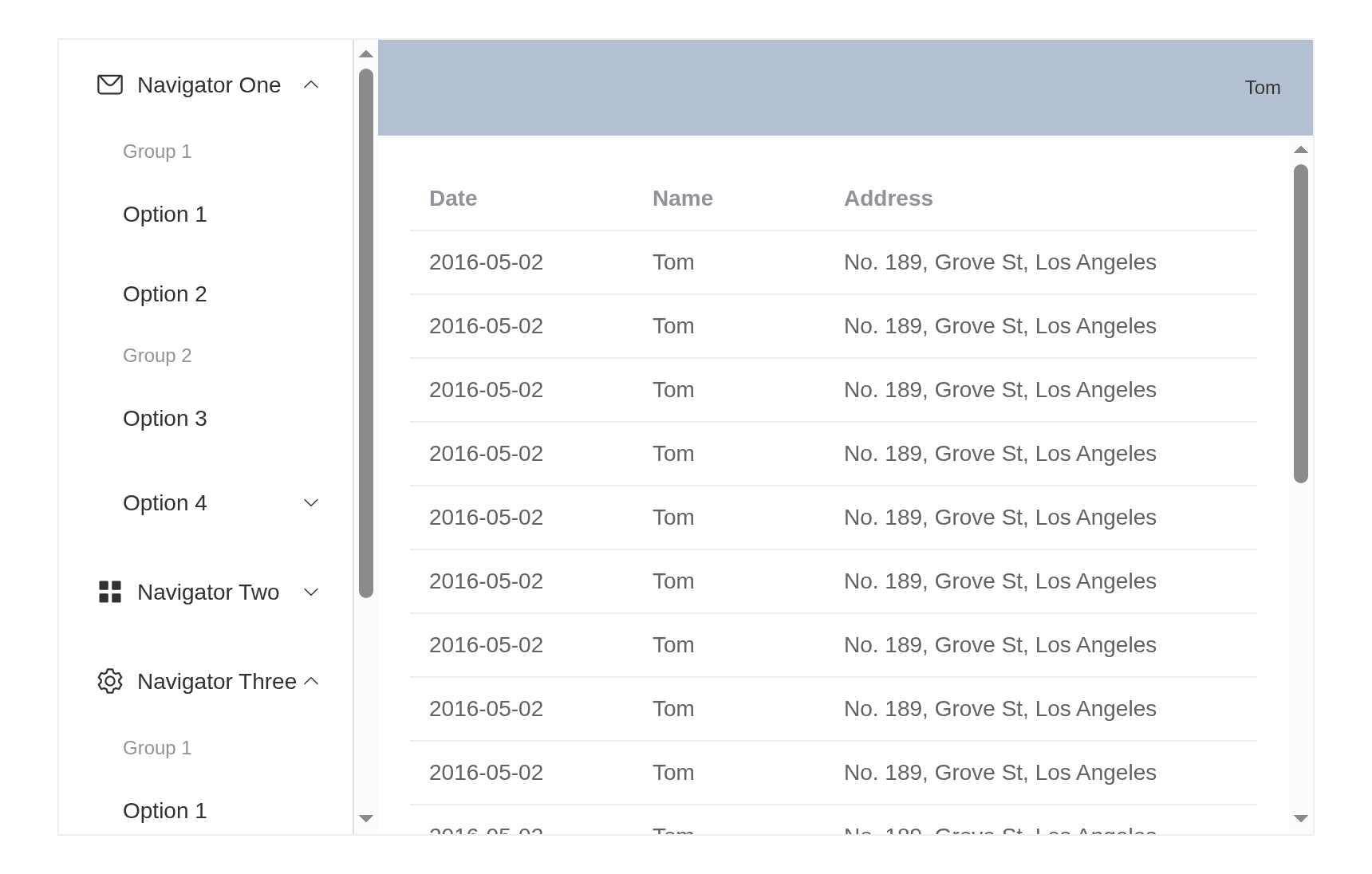
A sales overview
Filters in the header drive everything below them: the headline
numbers are el_statistic()s moved with
update_el_statistic(), the chart is an ordinary
plotOutput(), and the products table renders a progress bar
in a cell with a cell template.
# A sales overview: filters in the header, headline numbers in cards, a
# chart and a ranked table, all following the filters.
#
#   shiny::runApp(system.file("examples/dashboards/sales", package = "shiny.element"))

library(shiny)
library(shiny.element)

set.seed(42)
months <- seq(as.Date("2026-01-01"), by = "month", length.out = 9)
regions <- c("North", "South", "East", "West")
products <- c(
  "Laptops",
  "Monitors",
  "Keyboards",
  "Headsets",
  "Docks",
  "Webcams"
)
sales <- expand.grid(
  month = months,
  region = regions,
  product = products,
  stringsAsFactors = FALSE
)
sales$revenue <- round(runif(nrow(sales), 2, 30) * 1000)
sales$orders <- round(sales$revenue / runif(nrow(sales), 80, 160))

kpi_card <- function(id, title, prefix = NULL, suffix = NULL, precision = 0) {
  el_col(
    span = 6,
    el_card(
      shadow = "hover",
      el_statistic(
        id,
        value = 0,
        title = title,
        prefix = prefix,
        suffix = suffix,
        precision = precision,
        group_separator = ","
      )
    )
  )
}

ui <- el_page(
  el_container(
    el_header(
      style = "display: flex; align-items: center; justify-content: space-between;
               border-bottom: 1px solid #ebeef5",
      tags$h3("Sales overview", style = "margin: 0"),
      tags$div(
        style = "display: flex; gap: 10px",
        el_date_picker(
          "span",
          type = "monthrange",
          value = c("2026-01", "2026-09"),
          value_format = "yyyy-MM",
          format = "yyyy-MM",
          start_placeholder = "From",
          end_placeholder = "To",
          width = "260px",
          size = "small"
        ),
        el_select(
          "region",
          choices = regions,
          selected = regions,
          multiple = TRUE,
          collapse_tags = TRUE,
          size = "small",
          width = "220px"
        )
      )
    ),
    el_main(
      el_row(
        gutter = 16,
        kpi_card("revenue", "Revenue", prefix = "$"),
        kpi_card("orders", "Orders"),
        kpi_card("basket", "Average order", prefix = "$", precision = 2),
        kpi_card(
          "best",
          "Best month, share of revenue",
          suffix = "%",
          precision = 1
        )
      ),
      el_row(
        gutter = 16,
        style = "margin-top: 16px",
        el_col(
          span = 14,
          el_card(
            header = "Revenue by month",
            plotOutput("trend", height = "260px")
          )
        ),
        el_col(
          span = 10,
          el_card(
            header = "Products",
            el_table_output("products")
          )
        )
      )
    )
  )
)

server <- function(input, output, session) {
  # Both filters report on load; until they have, there is nothing to show
  picked <- reactive({
    req(input$span, input$region)
    span <- as.Date(paste0(input$span, "-01"))
    sales[
      sales$month >= span[1] &
        sales$month <= span[2] &
        sales$region %in% input$region,
    ]
  })

  observe({
    d <- picked()
    req(nrow(d) > 0)
    by_month <- tapply(d$revenue, d$month, sum)
    update_el_statistic(session, "revenue", value = sum(d$revenue))
    update_el_statistic(session, "orders", value = sum(d$orders))
    update_el_statistic(
      session,
      "basket",
      value = if (sum(d$orders)) sum(d$revenue) / sum(d$orders) else 0
    )
    update_el_statistic(
      session,
      "best",
      value = if (length(by_month)) 100 * max(by_month) / sum(by_month) else 0
    )
  })

  output$products <- render_el_table({
    d <- picked()
    req(nrow(d) > 0)
    by_product <- aggregate(revenue ~ product, d, sum)
    by_product <- by_product[order(-by_product$revenue), ]
    by_product$share <- round(
      100 * by_product$revenue / sum(by_product$revenue)
    )
    el_table(
      data = by_product,
      columns = list(
        list(type = "index", label = "#", width = "50"),
        list(prop = "product", label = "Product"),
        list(
          prop = "revenue",
          label = "Revenue",
          align = "right",
          formatter = JS(
            "function(r, c, v) { return '$' + v.toLocaleString(); }"
          )
        ),
        list(
          prop = "share",
          label = "Share",
          width = "130",
          cell = el$progress(
            ":percentage" = "scope.row.share",
            ":stroke-width" = "8"
          )
        )
      )
    )
  })

  output$trend <- renderPlot({
    d <- picked()
    req(nrow(d) > 0)
    by_month <- tapply(d$revenue, format(d$month, "%b"), sum)[format(
      unique(sort(d$month)),
      "%b"
    )]
    par(
      mar = c(3, 4, 1, 1),
      family = "sans",
      col.axis = "#606266",
      fg = "#dcdfe6"
    )
    barplot(
      by_month / 1000,
      col = "#409EFF",
      border = NA,
      las = 1,
      ylab = "Revenue ($k)",
      col.lab = "#606266"
    )
  })
}

shinyApp(ui, server)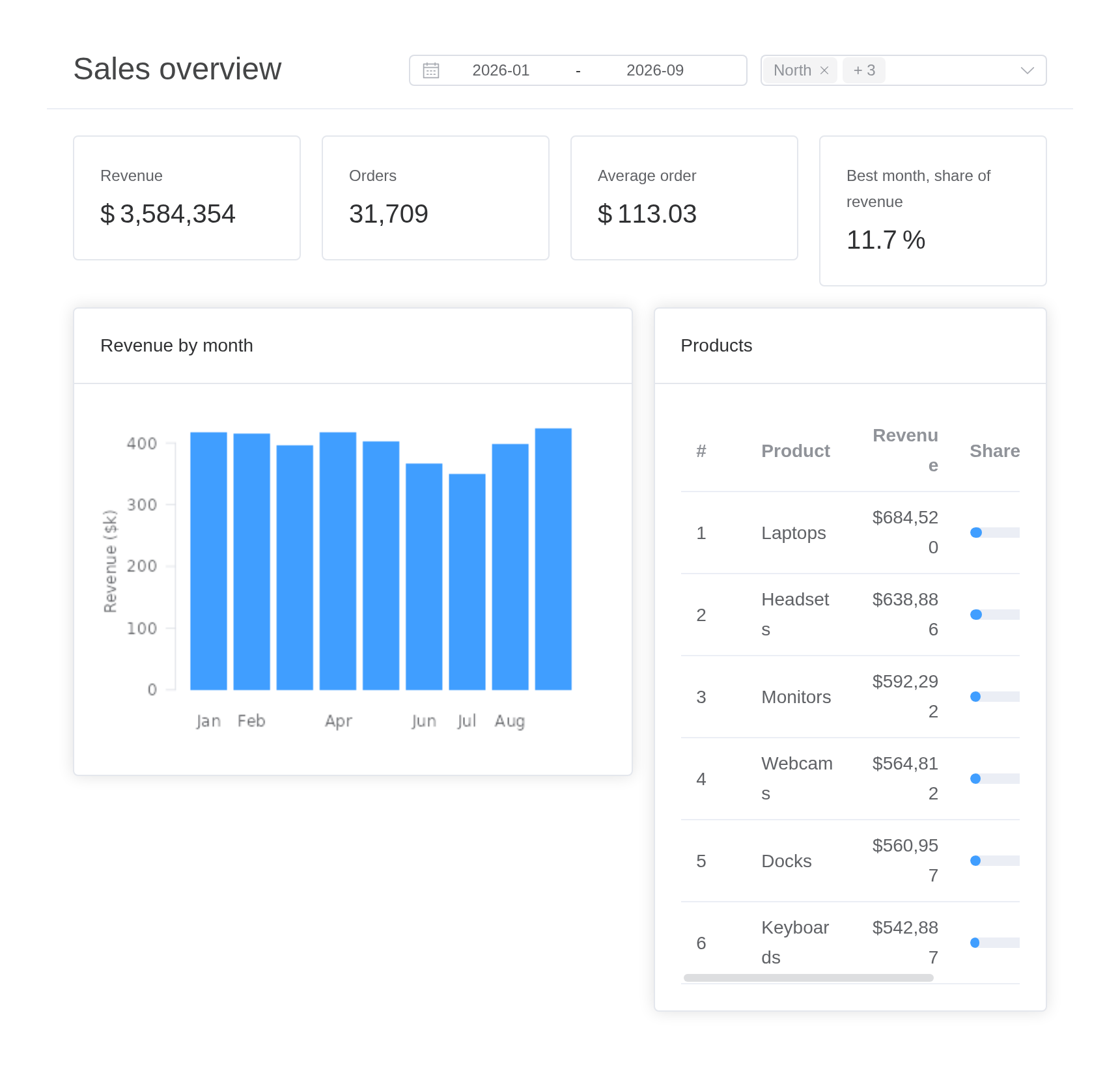
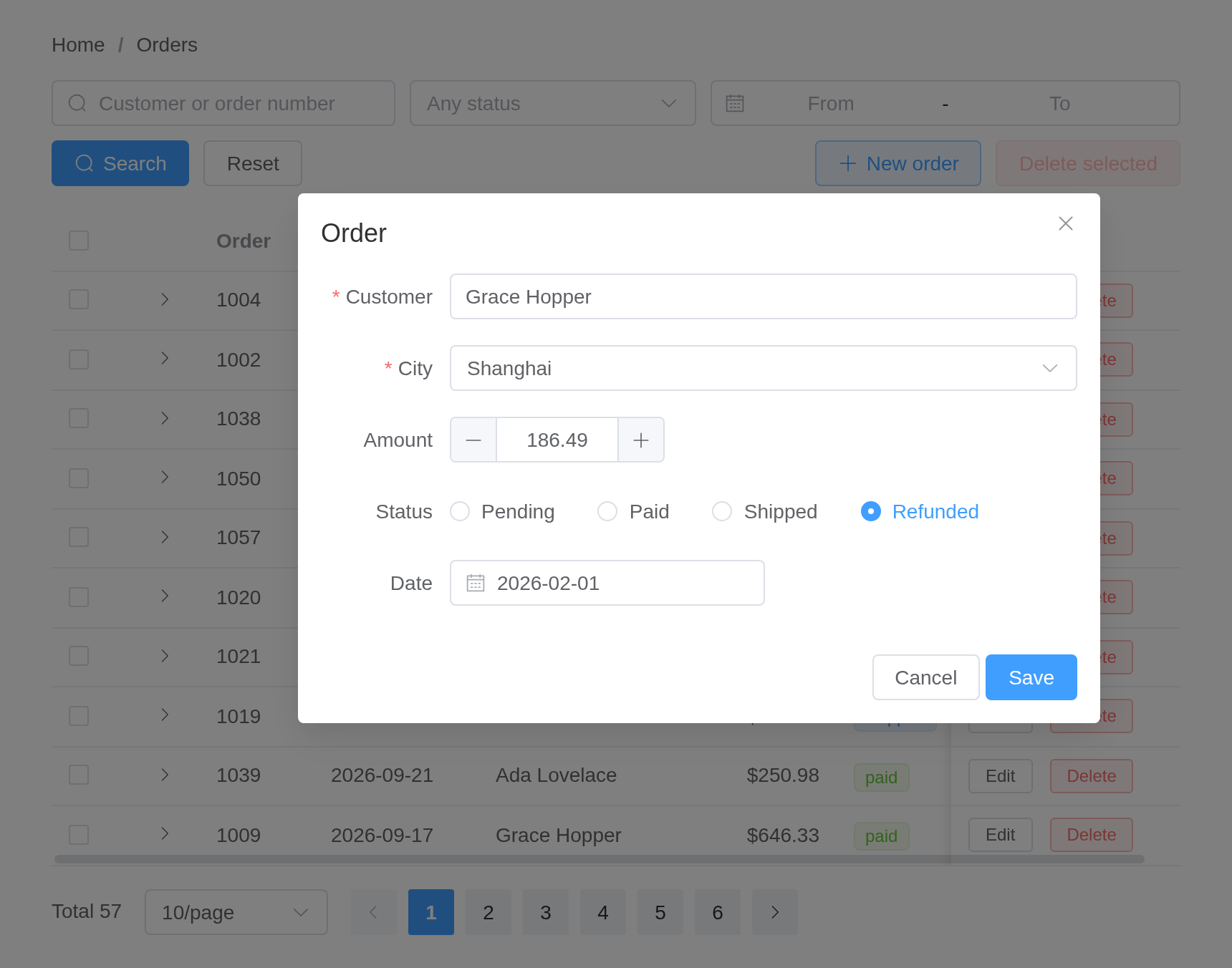
An orders admin page
The table most admin pages are built around: search over it, a status
tag and a pair of buttons in each row, an expanding row for detail,
sorting and paging done by the server, a dialog holding a form to add
and edit, and a confirmation before anything is deleted. Each row’s
buttons report through rowAction() –
input$orders_edit and input$orders_delete
carry the row.
# An orders admin page: search, a table with row actions, server-side
# sorting and paging, a dialog to add and edit, and confirmation to delete.
#
#   shiny::runApp(system.file("examples/dashboards/orders", package = "shiny.element"))

library(shiny)
library(shiny.element)

set.seed(1)
n <- 57
statuses <- c(
  Pending = "pending",
  Paid = "paid",
  Shipped = "shipped",
  Refunded = "refunded"
)
cities <- c("Beijing", "Shanghai", "Shenzhen", "Hangzhou")
seed_orders <- data.frame(
  id = 1000 + seq_len(n),
  date = format(as.Date("2026-09-30") - sample(0:60, n, TRUE)),
  customer = sample(
    c(
      "Ada Lovelace",
      "Grace Hopper",
      "Alan Turing",
      "Linus Torvalds",
      "Ken Thompson",
      "Barbara Liskov",
      "Donald Knuth"
    ),
    n,
    TRUE
  ),
  city = sample(cities, n, TRUE),
  amount = round(runif(n, 20, 900), 2),
  status = sample(unname(statuses), n, TRUE, prob = c(.2, .4, .3, .1)),
  items = sample(
    c("Laptop", "Monitor, cable", "Keyboard, mouse", "Dock"),
    n,
    TRUE
  )
)

# A tag type per status, chosen in the browser for each row
status_tag <- el$tag(
  size = "small",
  ":type" = paste0(
    "({pending: 'warning', paid: 'success', shipped: 'primary', ",
    "refunded: 'info'})[scope.row.status]"
  ),
  "{{ scope.row.status }}"
)

columns <- list(
  list(
    type = "expand",
    cell = tags$div(
      tags$b("Items: "),
      "{{ scope.row.items }}",
      tags$br(),
      tags$b("Ships to: "),
      "{{ scope.row.city }}"
    )
  ),
  list(prop = "id", label = "Order", width = "80"),
  list(prop = "date", label = "Date", width = "115", sortable = "custom"),
  list(prop = "customer", label = "Customer", min_width = "140"),
  list(
    prop = "amount",
    label = "Amount",
    width = "110",
    align = "right",
    sortable = "custom",
    formatter = JS("function(r, c, v) { return '$' + v.toFixed(2); }")
  ),
  list(prop = "status", label = "Status", width = "100", cell = status_tag),
  # Pinned to the right edge, so the buttons stay in view when the table
  # is narrower than its columns and scrolls sideways
  list(
    label = "",
    width = "160",
    fixed = "right",
    cell = tagList(
      el$button(size = "small", "@click" = "rowAction('edit', scope)", "Edit"),
      el$button(
        size = "small",
        type = "danger",
        plain = NA,
        "@click" = "rowAction('delete', scope)",
        "Delete"
      )
    )
  )
)

ui <- el_page(
  el_breadcrumb(
    "crumbs",
    items = list(list(label = "Home"), list(label = "Orders"))
  ),
  tags$div(
    style = "display: flex; flex-wrap: wrap; gap: 10px; margin: 18px 0",
    el_input(
      "q",
      placeholder = "Customer or order number",
      clearable = TRUE,
      prefix_icon = "el-icon-search",
      width = "240px"
    ),
    el_select(
      "status",
      choices = statuses,
      multiple = TRUE,
      collapse_tags = TRUE,
      placeholder = "Any status",
      clearable = TRUE,
      width = "200px"
    ),
    el_date_picker(
      "dates",
      type = "daterange",
      start_placeholder = "From",
      end_placeholder = "To",
      width = "260px"
    ),
    el_button("search", "Search", type = "primary", icon = "el-icon-search"),
    el_button("reset", "Reset"),
    tags$div(style = "flex: 1"),
    el_button(
      "add",
      "New order",
      type = "primary",
      plain = TRUE,
      icon = "el-icon-plus"
    ),
    el_button(
      "remove_many",
      "Delete selected",
      type = "danger",
      plain = TRUE,
      disabled = TRUE
    )
  ),
  el_table_output("orders"),
  tags$div(
    style = "margin-top: 16px; text-align: right",
    el_pagination(
      "pager",
      total = n,
      page_size = 10,
      page_sizes = c(10, 20, 50),
      layout = "total, sizes, prev, pager, next",
      background = TRUE
    )
  ),

  el_dialog(
    "editor",
    title = "Order",
    width = "560px",
    # The dialog's footer holds the buttons, so the form draws none of its own
    content = el_form(
      id = "order_form",
      label_width = "90px",
      submit_label = NULL,
      el_form_field(
        "customer",
        "input",
        label = "Customer",
        rules = el_rule(required = TRUE, message = "Who is it for?")
      ),
      el_form_field(
        "city",
        "select",
        label = "City",
        choices = cities,
        rules = el_rule(
          required = TRUE,
          message = "Pick a city",
          trigger = "change"
        )
      ),
      el_form_field(
        "amount",
        "input-number",
        label = "Amount",
        min = 0,
        precision = 2,
        step = 10
      ),
      el_form_field(
        "status",
        "radio-group",
        label = "Status",
        choices = statuses,
        value = "pending"
      ),
      el_form_field(
        "date",
        "date-picker",
        label = "Date",
        value_format = "yyyy-MM-dd"
      )
    ),
    footer = tagList(
      el_button("cancel", "Cancel"),
      el_button("save", "Save", type = "primary")
    )
  )
)

server <- function(input, output, session) {
  orders <- reactiveVal(seed_orders)
  query <- reactiveVal(list())
  sorting <- reactiveVal(list(column = "date", order = "descending"))
  editing <- reactiveVal(NULL) # the id being edited; NA for a new order

  # ── search ──────────────────────────────────────────────────────────────
  observeEvent(input$search, {
    query(list(q = input$q, status = input$status, dates = input$dates))
  })
  observeEvent(input$reset, {
    update_el_input(session, "q", value = "")
    update_el_select(session, "status", selected = list())
    update_el_date_picker(session, "dates", value = list())
    query(list())
  })

  matching <- reactive({
    d <- orders()
    q <- query()
    if (length(q$q) && nzchar(q$q)) {
      hit <- grepl(q$q, d$customer, ignore.case = TRUE) |
        grepl(q$q, d$id, fixed = TRUE)
      d <- d[hit, ]
    }
    if (length(q$status)) {
      d <- d[d$status %in% q$status, ]
    }
    if (length(q$dates) == 2) {
      d <- d[d$date >= q$dates[1] & d$date <= q$dates[2], ]
    }
    s <- sorting()
    if (length(s$order) && !is.null(s$column)) {
      d <- d[order(d[[s$column]], decreasing = s$order == "descending"), ]
    }
    d
  })

  # ── sorting and paging, both done here rather than in the browser ───────
  observeEvent(input$orders_sort_change, sorting(input$orders_sort_change))

  page <- reactive({
    d <- matching()
    size <- input$pager_size %||% 10
    first <- ((input$pager %||% 1) - 1) * size
    d[seq_len(nrow(d)) > first & seq_len(nrow(d)) <= first + size, ]
  })

  observe({
    update_el_pagination(session, "pager", total = nrow(matching()))
  })
  output$orders <- render_el_table(el_table(
    data = page(),
    selection = TRUE,
    row_key = "id",
    columns = columns,
    empty_text = "No orders match"
  ))

  # ── selection ────────────────────────────────────────────────────────────
  observe({
    update_el_button(
      session,
      "remove_many",
      disabled = !length(input$orders_selection_rows)
    )
  })

  # ── add and edit ─────────────────────────────────────────────────────────
  open_editor <- function(row) {
    editing(row$id)
    update_el_form(
      session,
      "order_form",
      model = row[c("customer", "city", "amount", "status", "date")]
    )
    update_el_dialog(session, "editor", visible = TRUE)
  }
  observeEvent(input$add, {
    open_editor(list(
      id = NA,
      customer = "",
      city = "",
      amount = 0,
      status = "pending",
      date = format(Sys.Date())
    ))
  })
  observeEvent(input$orders_edit, open_editor(input$orders_edit$row))
  observeEvent(
    input$cancel,
    update_el_dialog(session, "editor", visible = FALSE)
  )
  observeEvent(input$save, el_form_validate(session, "order_form"))

  observeEvent(input$order_form_submit, {
    req(isTRUE(input$order_form_valid))
    m <- input$order_form
    d <- orders()
    if (is.na(editing())) {
      row <- data.frame(
        id = max(d$id) + 1,
        date = m$date,
        customer = m$customer,
        city = m$city,
        amount = m$amount,
        status = m$status,
        items = ""
      )
      orders(rbind(row, d))
      el_message(session, sprintf("Order %d added", row$id), type = "success")
    } else {
      i <- match(editing(), d$id)
      d[i, c("customer", "city", "amount", "status", "date")] <-
        list(m$customer, m$city, m$amount, m$status, m$date)
      orders(d)
      el_message(
        session,
        sprintf("Order %d saved", editing()),
        type = "success"
      )
    }
    update_el_dialog(session, "editor", visible = FALSE)
  })

  # ── delete, one or many, after asking ───────────────────────────────────
  doomed <- reactiveVal(NULL)
  ask_delete <- function(ids) {
    doomed(ids)
    el_message_box(
      session,
      "confirm_delete",
      sprintf(
        "Delete %s? This cannot be undone.",
        if (length(ids) == 1) {
          paste("order", ids)
        } else {
          paste(length(ids), "orders")
        }
      ),
      title = "Delete",
      type = "warning",
      confirm_button_text = "Delete",
      cancel_button_text = "Keep"
    )
  }
  observeEvent(input$orders_delete, ask_delete(input$orders_delete$row$id))
  observeEvent(input$remove_many, {
    ask_delete(input$orders_selection_change$id)
  })
  observeEvent(input$confirm_delete, {
    req(identical(input$confirm_delete, "confirm"))
    orders(orders()[!orders()$id %in% doomed(), ])
    el_message(
      session,
      sprintf("Deleted %d order(s)", length(doomed())),
      type = "success"
    )
  })
}

shinyApp(ui, server)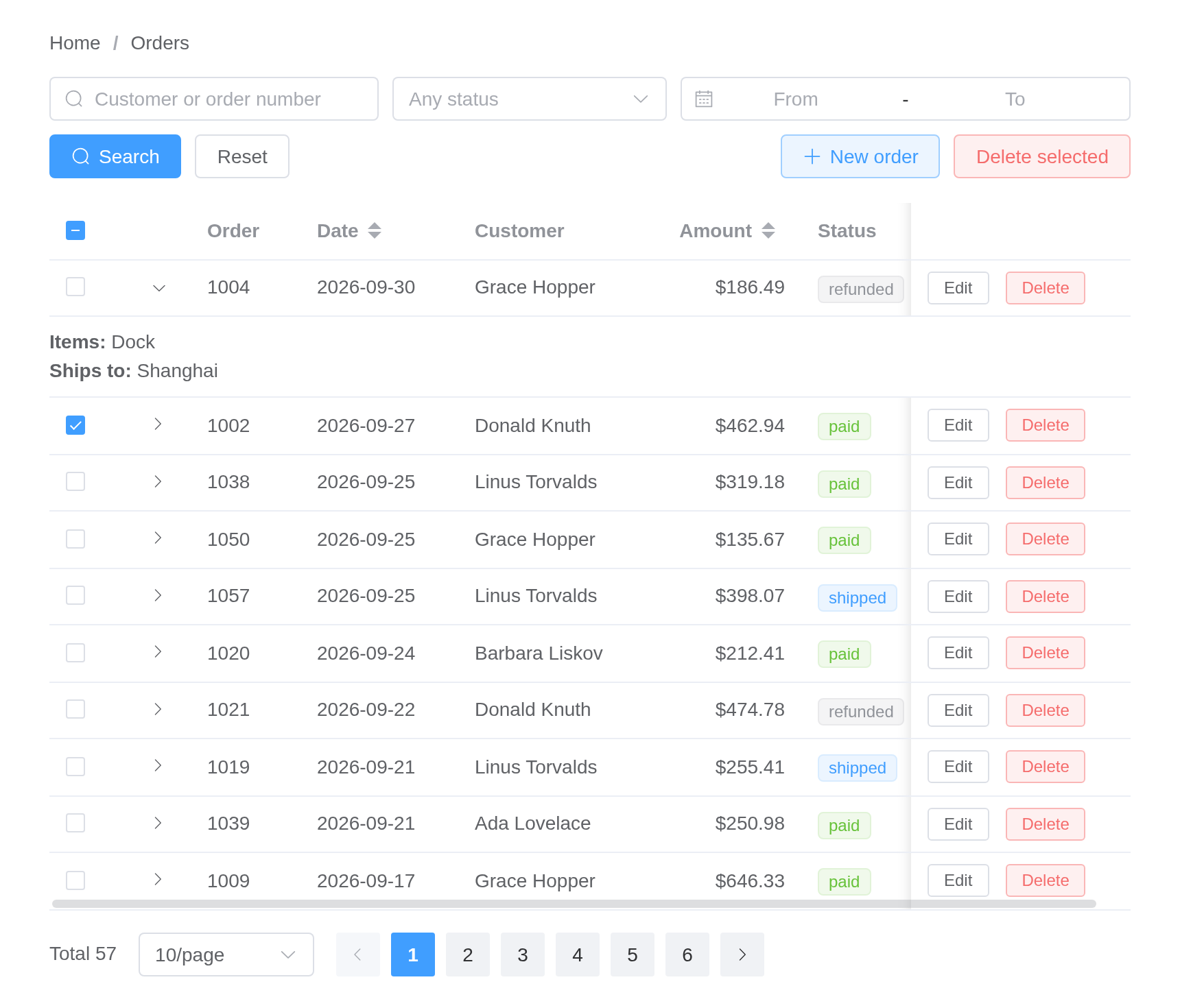
Opening the editor from a row’s Edit button fills the form from that row:
# An orders admin page: search, a table with row actions, server-side
# sorting and paging, a dialog to add and edit, and confirmation to delete.
#
#   shiny::runApp(system.file("examples/dashboards/orders", package = "shiny.element"))

library(shiny)
library(shiny.element)

set.seed(1)
n <- 57
statuses <- c(
  Pending = "pending",
  Paid = "paid",
  Shipped = "shipped",
  Refunded = "refunded"
)
cities <- c("Beijing", "Shanghai", "Shenzhen", "Hangzhou")
seed_orders <- data.frame(
  id = 1000 + seq_len(n),
  date = format(as.Date("2026-09-30") - sample(0:60, n, TRUE)),
  customer = sample(
    c(
      "Ada Lovelace",
      "Grace Hopper",
      "Alan Turing",
      "Linus Torvalds",
      "Ken Thompson",
      "Barbara Liskov",
      "Donald Knuth"
    ),
    n,
    TRUE
  ),
  city = sample(cities, n, TRUE),
  amount = round(runif(n, 20, 900), 2),
  status = sample(unname(statuses), n, TRUE, prob = c(.2, .4, .3, .1)),
  items = sample(
    c("Laptop", "Monitor, cable", "Keyboard, mouse", "Dock"),
    n,
    TRUE
  )
)

# A tag type per status, chosen in the browser for each row
status_tag <- el$tag(
  size = "small",
  ":type" = paste0(
    "({pending: 'warning', paid: 'success', shipped: 'primary', ",
    "refunded: 'info'})[scope.row.status]"
  ),
  "{{ scope.row.status }}"
)

columns <- list(
  list(
    type = "expand",
    cell = tags$div(
      tags$b("Items: "),
      "{{ scope.row.items }}",
      tags$br(),
      tags$b("Ships to: "),
      "{{ scope.row.city }}"
    )
  ),
  list(prop = "id", label = "Order", width = "80"),
  list(prop = "date", label = "Date", width = "115", sortable = "custom"),
  list(prop = "customer", label = "Customer", min_width = "140"),
  list(
    prop = "amount",
    label = "Amount",
    width = "110",
    align = "right",
    sortable = "custom",
    formatter = JS("function(r, c, v) { return '$' + v.toFixed(2); }")
  ),
  list(prop = "status", label = "Status", width = "100", cell = status_tag),
  # Pinned to the right edge, so the buttons stay in view when the table
  # is narrower than its columns and scrolls sideways
  list(
    label = "",
    width = "160",
    fixed = "right",
    cell = tagList(
      el$button(size = "small", "@click" = "rowAction('edit', scope)", "Edit"),
      el$button(
        size = "small",
        type = "danger",
        plain = NA,
        "@click" = "rowAction('delete', scope)",
        "Delete"
      )
    )
  )
)

ui <- el_page(
  el_breadcrumb(
    "crumbs",
    items = list(list(label = "Home"), list(label = "Orders"))
  ),
  tags$div(
    style = "display: flex; flex-wrap: wrap; gap: 10px; margin: 18px 0",
    el_input(
      "q",
      placeholder = "Customer or order number",
      clearable = TRUE,
      prefix_icon = "el-icon-search",
      width = "240px"
    ),
    el_select(
      "status",
      choices = statuses,
      multiple = TRUE,
      collapse_tags = TRUE,
      placeholder = "Any status",
      clearable = TRUE,
      width = "200px"
    ),
    el_date_picker(
      "dates",
      type = "daterange",
      start_placeholder = "From",
      end_placeholder = "To",
      width = "260px"
    ),
    el_button("search", "Search", type = "primary", icon = "el-icon-search"),
    el_button("reset", "Reset"),
    tags$div(style = "flex: 1"),
    el_button(
      "add",
      "New order",
      type = "primary",
      plain = TRUE,
      icon = "el-icon-plus"
    ),
    el_button(
      "remove_many",
      "Delete selected",
      type = "danger",
      plain = TRUE,
      disabled = TRUE
    )
  ),
  el_table_output("orders"),
  tags$div(
    style = "margin-top: 16px; text-align: right",
    el_pagination(
      "pager",
      total = n,
      page_size = 10,
      page_sizes = c(10, 20, 50),
      layout = "total, sizes, prev, pager, next",
      background = TRUE
    )
  ),

  el_dialog(
    "editor",
    title = "Order",
    width = "560px",
    # The dialog's footer holds the buttons, so the form draws none of its own
    content = el_form(
      id = "order_form",
      label_width = "90px",
      submit_label = NULL,
      el_form_field(
        "customer",
        "input",
        label = "Customer",
        rules = el_rule(required = TRUE, message = "Who is it for?")
      ),
      el_form_field(
        "city",
        "select",
        label = "City",
        choices = cities,
        rules = el_rule(
          required = TRUE,
          message = "Pick a city",
          trigger = "change"
        )
      ),
      el_form_field(
        "amount",
        "input-number",
        label = "Amount",
        min = 0,
        precision = 2,
        step = 10
      ),
      el_form_field(
        "status",
        "radio-group",
        label = "Status",
        choices = statuses,
        value = "pending"
      ),
      el_form_field(
        "date",
        "date-picker",
        label = "Date",
        value_format = "yyyy-MM-dd"
      )
    ),
    footer = tagList(
      el_button("cancel", "Cancel"),
      el_button("save", "Save", type = "primary")
    )
  )
)

server <- function(input, output, session) {
  orders <- reactiveVal(seed_orders)
  query <- reactiveVal(list())
  sorting <- reactiveVal(list(column = "date", order = "descending"))
  editing <- reactiveVal(NULL) # the id being edited; NA for a new order

  # ── search ──────────────────────────────────────────────────────────────
  observeEvent(input$search, {
    query(list(q = input$q, status = input$status, dates = input$dates))
  })
  observeEvent(input$reset, {
    update_el_input(session, "q", value = "")
    update_el_select(session, "status", selected = list())
    update_el_date_picker(session, "dates", value = list())
    query(list())
  })

  matching <- reactive({
    d <- orders()
    q <- query()
    if (length(q$q) && nzchar(q$q)) {
      hit <- grepl(q$q, d$customer, ignore.case = TRUE) |
        grepl(q$q, d$id, fixed = TRUE)
      d <- d[hit, ]
    }
    if (length(q$status)) {
      d <- d[d$status %in% q$status, ]
    }
    if (length(q$dates) == 2) {
      d <- d[d$date >= q$dates[1] & d$date <= q$dates[2], ]
    }
    s <- sorting()
    if (length(s$order) && !is.null(s$column)) {
      d <- d[order(d[[s$column]], decreasing = s$order == "descending"), ]
    }
    d
  })

  # ── sorting and paging, both done here rather than in the browser ───────
  observeEvent(input$orders_sort_change, sorting(input$orders_sort_change))

  page <- reactive({
    d <- matching()
    size <- input$pager_size %||% 10
    first <- ((input$pager %||% 1) - 1) * size
    d[seq_len(nrow(d)) > first & seq_len(nrow(d)) <= first + size, ]
  })

  observe({
    update_el_pagination(session, "pager", total = nrow(matching()))
  })
  output$orders <- render_el_table(el_table(
    data = page(),
    selection = TRUE,
    row_key = "id",
    columns = columns,
    empty_text = "No orders match"
  ))

  # ── selection ────────────────────────────────────────────────────────────
  observe({
    update_el_button(
      session,
      "remove_many",
      disabled = !length(input$orders_selection_rows)
    )
  })

  # ── add and edit ─────────────────────────────────────────────────────────
  open_editor <- function(row) {
    editing(row$id)
    update_el_form(
      session,
      "order_form",
      model = row[c("customer", "city", "amount", "status", "date")]
    )
    update_el_dialog(session, "editor", visible = TRUE)
  }
  observeEvent(input$add, {
    open_editor(list(
      id = NA,
      customer = "",
      city = "",
      amount = 0,
      status = "pending",
      date = format(Sys.Date())
    ))
  })
  observeEvent(input$orders_edit, open_editor(input$orders_edit$row))
  observeEvent(
    input$cancel,
    update_el_dialog(session, "editor", visible = FALSE)
  )
  observeEvent(input$save, el_form_validate(session, "order_form"))

  observeEvent(input$order_form_submit, {
    req(isTRUE(input$order_form_valid))
    m <- input$order_form
    d <- orders()
    if (is.na(editing())) {
      row <- data.frame(
        id = max(d$id) + 1,
        date = m$date,
        customer = m$customer,
        city = m$city,
        amount = m$amount,
        status = m$status,
        items = ""
      )
      orders(rbind(row, d))
      el_message(session, sprintf("Order %d added", row$id), type = "success")
    } else {
      i <- match(editing(), d$id)
      d[i, c("customer", "city", "amount", "status", "date")] <-
        list(m$customer, m$city, m$amount, m$status, m$date)
      orders(d)
      el_message(
        session,
        sprintf("Order %d saved", editing()),
        type = "success"
      )
    }
    update_el_dialog(session, "editor", visible = FALSE)
  })

  # ── delete, one or many, after asking ───────────────────────────────────
  doomed <- reactiveVal(NULL)
  ask_delete <- function(ids) {
    doomed(ids)
    el_message_box(
      session,
      "confirm_delete",
      sprintf(
        "Delete %s? This cannot be undone.",
        if (length(ids) == 1) {
          paste("order", ids)
        } else {
          paste(length(ids), "orders")
        }
      ),
      title = "Delete",
      type = "warning",
      confirm_button_text = "Delete",
      cancel_button_text = "Keep"
    )
  }
  observeEvent(input$orders_delete, ask_delete(input$orders_delete$row$id))
  observeEvent(input$remove_many, {
    ask_delete(input$orders_selection_change$id)
  })
  observeEvent(input$confirm_delete, {
    req(identical(input$confirm_delete, "confirm"))
    orders(orders()[!orders()$id %in% doomed(), ])
    el_message(
      session,
      sprintf("Deleted %d order(s)", length(doomed())),
      type = "success"
    )
  })
}

shinyApp(ui, server)